Fuzz Pedal Troubleshooting?

Masta' C

Well-known member
Got my hands on a first-gen BBE "Free Fuzz". The pedal is in great shape cosmetically, but something is wrong. The pedal turns on (LED light) with power and passes the signal fine in bypass mode, but as soon as the fuzz is activated, the pedal goes completely silent. Not having this issue with any of my other pedals.

Any thoughts? How does one go about troubleshooting this sort of thing?

I tried different cables, power supplies, etc., just to be sure. Nothing on the top of the PCB (see pics) looks damaged, loose, or missing. Wires and solder joints all appear to be in good shape.

I'd love to get this thing working...hate to let a good fuzz go to waste :)

dKWDTcK.jpg


tCk6baq.jpg
 
First thing to check is the connections on the switch itself. Could just be a loose output wire.

There seems to be something weird going on with R9. It seems to have been replaced with two resistors rather than the single one you would expect. Mods are always the first thing I suspect when a pedal isn't working. If that's not the issue, I'd start by sniffing stuff and see if you can smell any particular component that smells like burned electronics (power surge, 18 instead of 9 volts can cause this) but usually you'll see discoloration if this is the case. If they all smell fine, then you need to play with your multi-meter and double check component values. I've had the canister electrolytic capacitors occasionally just die on me.
 
Yes, I noticed that R9 has 2 resistors bridged. Is that likely to be a mod by the previous owner?

Looking closely at the pads, the solder isn't as clean as seen on the other components...

sSg4nKy.jpg
 
It’s probably a bad stomp switch. If you “engage” it and bridge the jumpers that should be connected, does it work?

Also did you try with a battery?
 
No, I haven't tried it with a battery. Will do that and report back. I'll try jumping the pins at the footswitch also.

I did find this photo online showing the stock circuit. Interestingly, the user that posted it had no sound in either bypass or when activated. I do get sound when bypassed.

NOTE: The shot below is of the same model, but is not my pedal...

y0tfOMt.jpg
 
Last edited:
I think there should be two wires to each jack
I can't see why it only has one to the output jack

I may be missing something
 
I think there should be two wires to each jack
I can't see why it only has one to the output jack

I may be missing something

I saw this mentioned in another thread about these pedals, but the consensus was that the wiring you see here is correct. Also, you can see that both my pedal and the other example have only one wire on the output jack and 3 on the input side of each, so this is just how they were made.
 
Those 3PDT switches have a rep to go bad, try hardwiring the pedal to be in On position without the switch, that will clear out the switch issue if any. Before that, try reflowing the solder for the wires connected to the pcb, can't make out from the pics if they are through hole or flat pads terminals.
Odd that it was not passing any signal but after shipping is working in bypass mode, most likely points towards the wires or the switch:33:
 
Those 3PDT switches have a rep to go bad, try hardwiring the pedal to be in On position without the switch, that will clear out the switch issue if any. Before that, try reflowing the solder for the wires connected to the pcb, can't make out from the pics if they are through hole or flat pads terminals.
Odd that it was not passing any signal but after shipping is working in bypass mode, most likely points towards the wires or the switch:33:

bang it on the table and try it
 
Ok, using a battery didn't change anything. Pedal turns on, works fine in bypass mode, no sound when activated

Jumping the lead from SW1B (out) directly to the output jack made no difference

I don't have a way to test the capacitance of the capacitor with my multimeter, but it looks "ok" visually

What's next?

Some more PCB shots:

rcICdc2.jpg


bbyzucV.jpg


X3rHOhU.jpg
 
meter on the switch contacts

******************************************

checking caps
you have to remove one leg from the circuit

set meter to ohms
watch the value either steadily raise or lower then reset

cant determine value but if it cycles its fine
 
So here’s the deal with the input and out put jacks. The output is grounded via the enclosure. I do this a lot. The two resistor values add up to what’s supposed to go into r9. I’m curious what happened before it stopped working. Commonly what happens is a wrong dc adapter is used. If this is the case, the diode by the power jack would need to be replaced. To test the stomp, set your DMM for continuity. In one position the three middle stomp lugs are connected to the lugs directly above or below the middle, and in the other position, what ever it wasn’t connected to before. If you have an audio probe you can trace the audio path if you have the schematic. If you don’t have one, they’re easy enough to make, google knows all.


Sent from my iPhone using Tapatalk
 
So here’s the deal with the input and out put jacks. The output is grounded via the enclosure. I do this a lot. The two resistor values add up to what’s supposed to go into r9. I’m curious what happened before it stopped working. Commonly what happens is a wrong dc adapter is used. If this is the case, the diode by the power jack would need to be replaced. To test the stomp, set your DMM for continuity. In one position the three middle stomp lugs are connected to the lugs directly above or below the middle, and in the other position, what ever it wasn’t connected to before. If you have an audio probe you can trace the audio path if you have the schematic. If you don’t have one, they’re easy enough to make, google knows all.

Thank you for your reply.

In the "active" position, I get continuity between the center and top middle lugs only. In the "bypass" position, I get continuity between the center and lower middle lugs only. Is this informative?

Honestly, I've never used an audio probe and I'm not overly confident with schematics. I've actually never worked on pedals before.

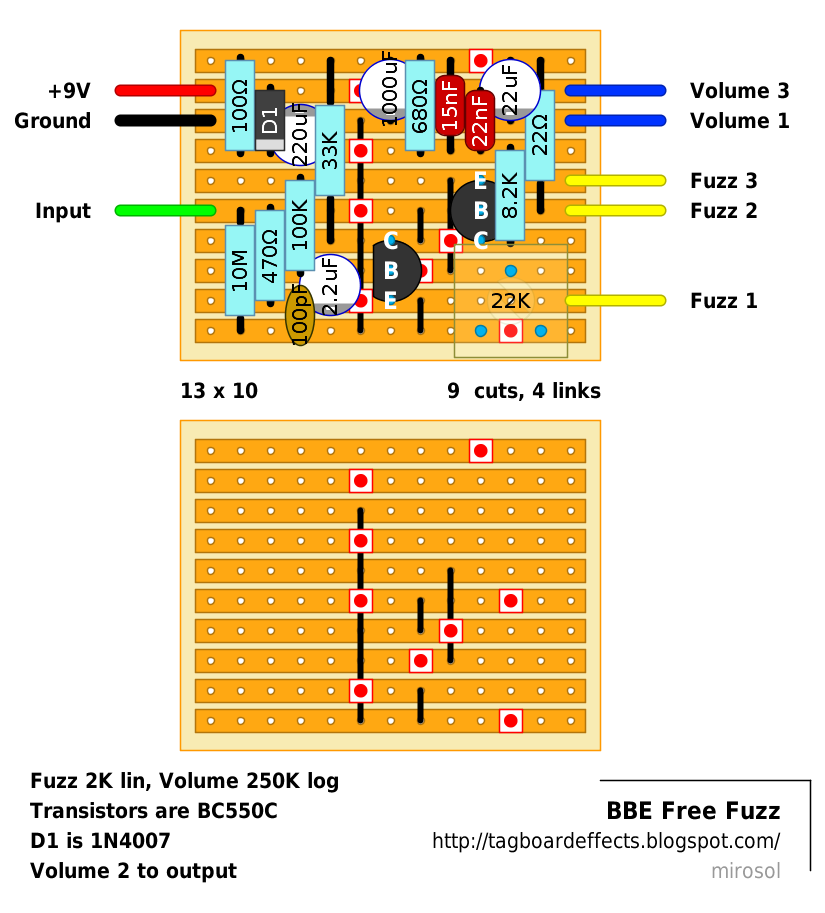
I found this image in a search, which claims to be a DIY version of the Free Fuzz circuit. Some threads suggested it's a Fuzz Face variation. Any idea how to read it and/or if it is useful in my case?

BBE-Free-Fuzz.png
 
Last edited:
The horizontal strips, or rows, are a like a trace. They are all connected together. Except where the red squares with dots are; the traces are cut there to isolate smaller length strips. The black links are jumpers which connect their respective top and bottom rows. However I don't know if it applies to your circuit.
 
Thank you for your reply.

In the "active" position, I get continuity between the center and top middle lugs only. In the "bypass" position, I get continuity between the center and lower middle lugs only. Is this informative?

Honestly, I've never used an audio probe and I'm not overly confident with schematics. I've actually never worked on pedals before.

I found this image in a search, which claims to be a DIY version of the Free Fuzz circuit. Some threads suggested it's a Fuzz Face variation. Any idea how to read it and/or if it is useful in my case?

BBE-Free-Fuzz.png

Worst case, you can just buy the components and some tag board to rebuild the whole circuit. :P
 
Thank you for your reply.

In the "active" position, I get continuity between the center and top middle lugs only. In the "bypass" position, I get continuity between the center and lower middle lugs only. Is this informative?

Honestly, I've never used an audio probe and I'm not overly confident with schematics. I've actually never worked on pedals before.

I found this image in a search, which claims to be a DIY version of the Free Fuzz circuit. Some threads suggested it's a Fuzz Face variation. Any idea how to read it and/or if it is useful in my case?

BBE-Free-Fuzz.png

Sounds like a bad stomp switch.


Sent from my iPhone using Tapatalk
 
Back
Top