DI box to pick an amp's speaker power signal into recording interface?

IMENATOR

Well-known member
No Cab Sim intended, just want to put it between the power amp output and the actual speaker. No cab sim or silent recording, no attenuation, just the signal going to the speaker down to either mic level or line level so I can record it and then add a Cab IR in the DAW. Most likely to be used with small amps around 15 watts but if it can be used with bigger amps even better.
 
Re: DI box to pick an amp's speaker power signal into recording interface?

The Weber Mass has a line out for this.
 
Re: DI box to pick an amp's speaker power signal into recording interface?

radial has something that does this as well i believe
 
Re: DI box to pick an amp's speaker power signal into recording interface?

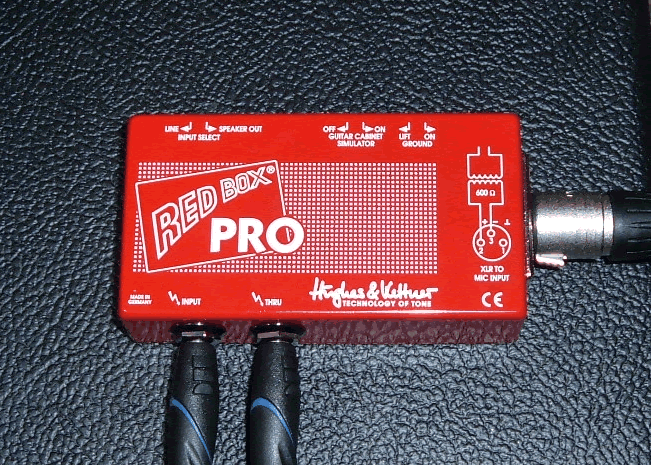
H&K Red Box works too, you can turn off the cab sim on it.
 
Re: DI box to pick an amp's speaker power signal into recording interface?

H&K Red Box works too, you can turn off the cab sim on it.

Which version are you thinking of -- the Pro? I don't think the current Red Box 5 lets you do that.
 
Re: DI box to pick an amp's speaker power signal into recording interface?

I was under the impression that, at least for tube amps, you need a speaker load, and direct out boxes like the Weber plug into the extension cabinet port of the head. I'm also under the impression he's asking for a way to take the speaker completely out of the chain, basically unplugging the leads from the speaker terminals and hooking them up to an interface.

Unless I'm both tired and stupid, which is possible.
 
Re: DI box to pick an amp's speaker power signal into recording interface?

He said he was using the speaker, at least that's how I read the OP.

Sorry, I have an old passive Red Box Pro that has a cab sim on/off switch, you're right lil' PB, the new 5 version and some of the others don't have an option to turn it off.

redbox01.gif
 
Re: DI box to pick an amp's speaker power signal into recording interface?

He said he was using the speaker, at least that's how I read the OP.

just want to put it between the power amp output and the actual speaker. just the signal going to the speaker down to either mic level or line level

Could be the language barrier, but to me this says "I want to record the signal coming from those wires that connect the head of the combo to the speaker terminals, but I want to remove them from the speaker". and "I want the signal that would normally go to the speaker taken down to mic or line level".
 
Re: DI box to pick an amp's speaker power signal into recording interface?

This is what the OP said"
"No cab sim or silent recording, no attenuation, just the signal going to the speaker down to either mic level or line level so I can record it and then add a Cab IR in the DAW."

He needs a splitter.......
I THINK it will be expensive to do both, but here is Just One Box.......
http://www.voodooamps.com/home/Prod...velBoxes/STL1pedalsize/tabid/365/Default.aspx
 
Re: DI box to pick an amp's speaker power signal into recording interface?

What you want is this:

Suhr ISO Line Out Box

This takes the *full* speaker signal (uncolored by speaker) and drops it to line level.

From there you can run FX after, then to power amp and speaker... or run it into your DAW then apply speaker iRs, etc...

However, rule #1: Make sure your amp has a load attached, be it a regular speaker or dummy load.

You can also use the "Speaker Thru" jacks to connect your regular speaker while still tapping the *full* speaker signal to line level.

What I do is:

Back of amp
(speaker out 1) -> speaker cable -> dummy load (amp is happy)
(speaker out 2) -> speaker cable -> line out box


Alternatively, you could get a HotPlate, set it to "Load" (dummy load) and use the line out in the back. But the previous item sounds better.
 
Last edited:
Re: DI box to pick an amp's speaker power signal into recording interface?

A lot of attenuators can also be used as a DI in between the amp and speaker. The trick is finding one that doesn't have speaker simulation on the DI and doesn't color the signal at to the speaker. The Rivera Rock Crusher or Radial Head Load Prodigy. would be good choices, the DI doesn't have the simulator, and they allow you to bypass the attenuator.
 
Last edited:
Re: DI box to pick an amp's speaker power signal into recording interface?

The Red Box Pro is still the cheapest choice, and does the same thing, just doesn't have the level control like the Voodoo or Suhr boxes. You just have to find one of the older ones as the new ones don't seem to allow you to turn off the cab sim.

The Behringer Ultra-G will do it too and it's active - http://www.music-group.com/Categories/Behringer/Signal-Processors/DI-Boxes/GI100/p/P0137

Radial has a bunch of solutions, the JDI, the J48 (active), the JDX48 (active and has switchable cab sim), and probably several more.

Of course, if I read your OP wrong, and you are wanting to disconnect your speaker, you will need something with a built in load which will be considerably more expensive.
 
Last edited:
Re: DI box to pick an amp's speaker power signal into recording interface?

The Red Box Pro is still the cheapest choice, and does the same thing, just doesn't have the level control like the Voodoo or Suhr boxes. You just have to find one of the older ones as the new ones don't seem to allow you to turn off the cab sim.

The Behringer Ultra-G will do it too and it's active - http://www.music-group.com/Categories/Behringer/Signal-Processors/DI-Boxes/GI100/p/P0137

Radial has a bunch of solutions, the JDI, the J48 (active), the JDX48 (active and has switchable cab sim), and probably several more.

Of course, if I read your OP wrong, and you are wanting to disconnect your speaker, you will need something with a built in load which will be considerably more expensive.
No, you are reading the OP correctly.
Those Red Box used to be "The Box" for doing this.....i wonder why they changed it.?
 
Re: DI box to pick an amp's speaker power signal into recording interface?

The new version of the Red Box has a lot more tonal options, great stuff except you can't just turn everything off, go figure...
 
Back
Top